

ZDR Signals is an experimental preview. It must be enabled for your organization;
organizations without preview access receive
404. Contact
support@raindrop.ai to join the preview.data, trace, tool calls — in memory and never stores
any of it. What persists is a sanitized identity shell: the event ID, timestamp, an opaque user ID,
and the explicit properties you choose to send; events that match a signal additionally record
the matched signal IDs. There is one deliberate exception: the labeled training examples you
upload to build a signal are retained — that is what the classifier is built and validated
against, and you control what goes into them. The retention table
below is the complete contract.
This guide builds Angry customer, a signal for a support assistant that should catch messages
where the customer is angry, frustrated, or threatening to escalate — chargebacks, lawyers, public
complaints — while leaving routine questions alone.
Choose how you work
Every step in this guide is available on four surfaces. They drive the same signals, and the results land in the same place.What you will build
1
Teach the behavior
Upload labeled examples. These are retained — they are what the classifier is built and
validated against.
2
Prove it before production
Exercise the active classifier in the Playground or with the synchronous evaluate endpoint.
These tests are not stored.
3
Evaluate production events privately
Fire-and-forget up to 1,000 events per
batch request. Raw data and trace are
evaluated in memory; poll the receipt for per-event results.4
Review and improve matches
Inspect sanitized event shells in Raindrop — matches carry signal membership — then add edge
cases to create a new immutable signal version.
Understand retention first
Training and production have different retention contracts. Use synthetic or approved examples for training, then use ZDR tracking for sensitive production content.batch batches await classification in a memory-only staging buffer: encrypted while
queued, capped at 15 minutes, destroyed on read, and never written to disk. Payloads otherwise
exist only during classification, for the duration of the run.
Before you start
You need:- Preview access for your organization
- An Organization API Key from Settings → API Keys
- Your project slug, if you use more than one project
- The Example files saved locally
Set up your surface
- CLI
- API
- Local UI
- Dashboard
Install with one command. The installer prompts for your Organization API Key, downloads the
CLI, verifies its checksum, and signs you in:In CI and other non-interactive environments, set The CLI requires Node.js 20 or newer and installs to
RAINDROP_API_KEY and the installer uses
it without prompting:~/.local/bin/raindrop-signals.
To update, re-run the installer.Credentials are saved to ~/.config/raindrop-signals/config.json, so commands work with no
environment variables. Each value resolves by precedence
flag → RAINDROP_* env var → saved config → default:Example files
Every--file flag and curl -d @file example in this guide refers to one of the five files below
by its exact name. The contents are self-contained fictional support conversations, so you need
nothing else to follow along. Labels use exact lowercase values everywhere: match and no_match.
Download all five into the current directory:
training-events.json
training-events.json
The labeled set that builds the signal: 4
match, 4 no_match, and 1 unlabeled example
(label is optional for dataset storage; unlabeled examples do not contribute to validation
metrics).training-events.json
evaluate-match.json
evaluate-match.json
A single event that should classify as
match against the built signal.evaluate-match.json
evaluate-no-match.json
evaluate-no-match.json
A single event that should classify as
no_match.evaluate-no-match.json
events-initial.json
events-initial.json
A ZDR batch of two production events: one matching (angry) and one non-matching (calm).
events-initial.json
refinement-events.json
refinement-events.json
Edge cases for a second signal version: sarcasm as
match, neutral outage reports as no_match.refinement-events.json
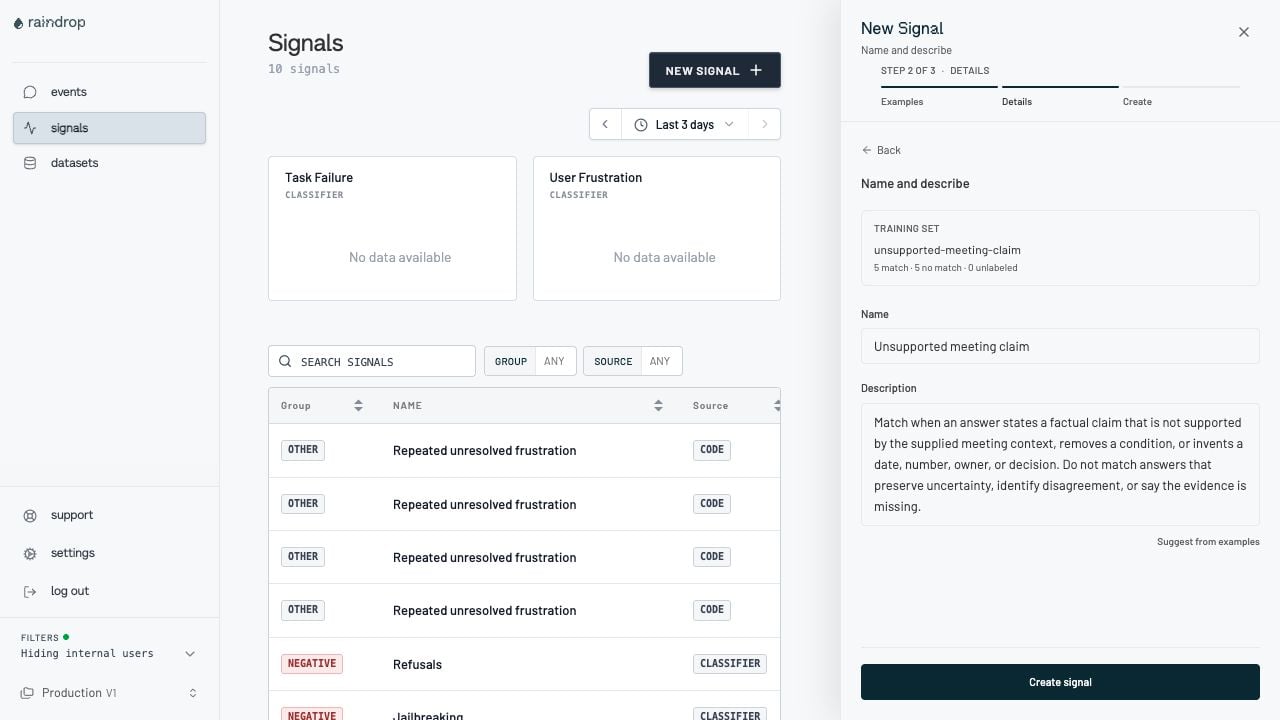
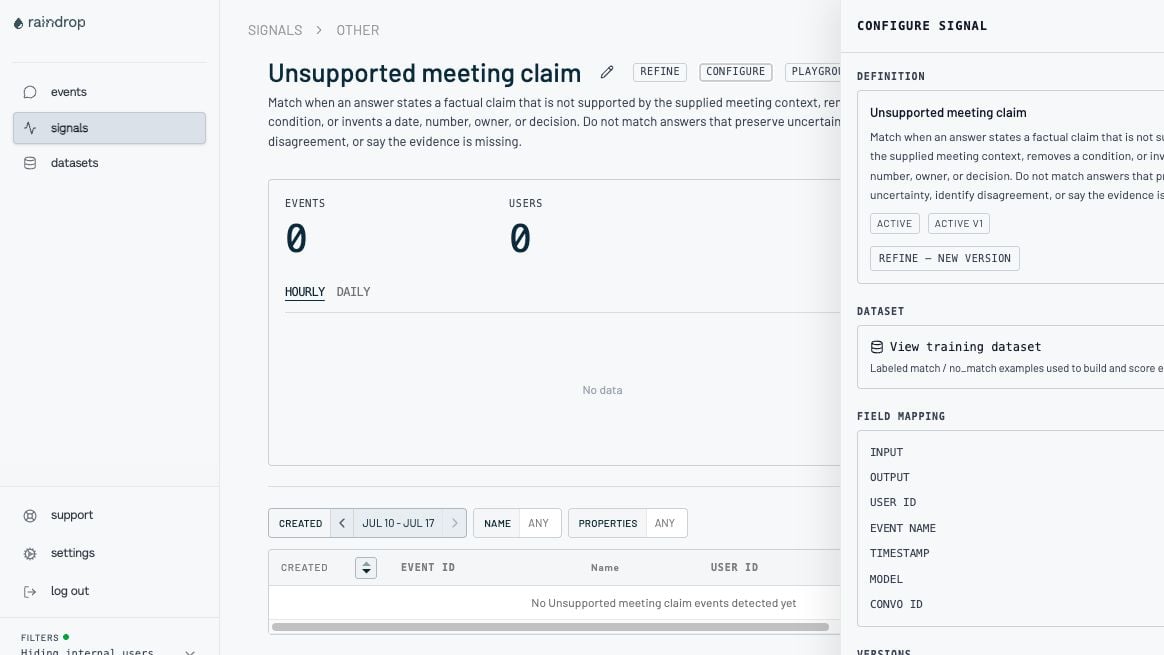
1. Create the signal
Creating a signal retains the labeled examples (that is the training contract), infers the input/output field mapping, generates a classifier, and scores it against every labeled example. The signal activates automatically only when the validation set has zero false positives, false negatives, and indeterminate outcomes; otherwise the build endsrequires_action and you refine
with more examples.
- CLI
- API
- Local UI
- Dashboard
One call: the labeled events attach inline, become a retained dataset, and the build is
queued. Copy the
--watch polls the build job until it finishes (usually a minute or two):signal_id from the output into a shell variable — later steps use it: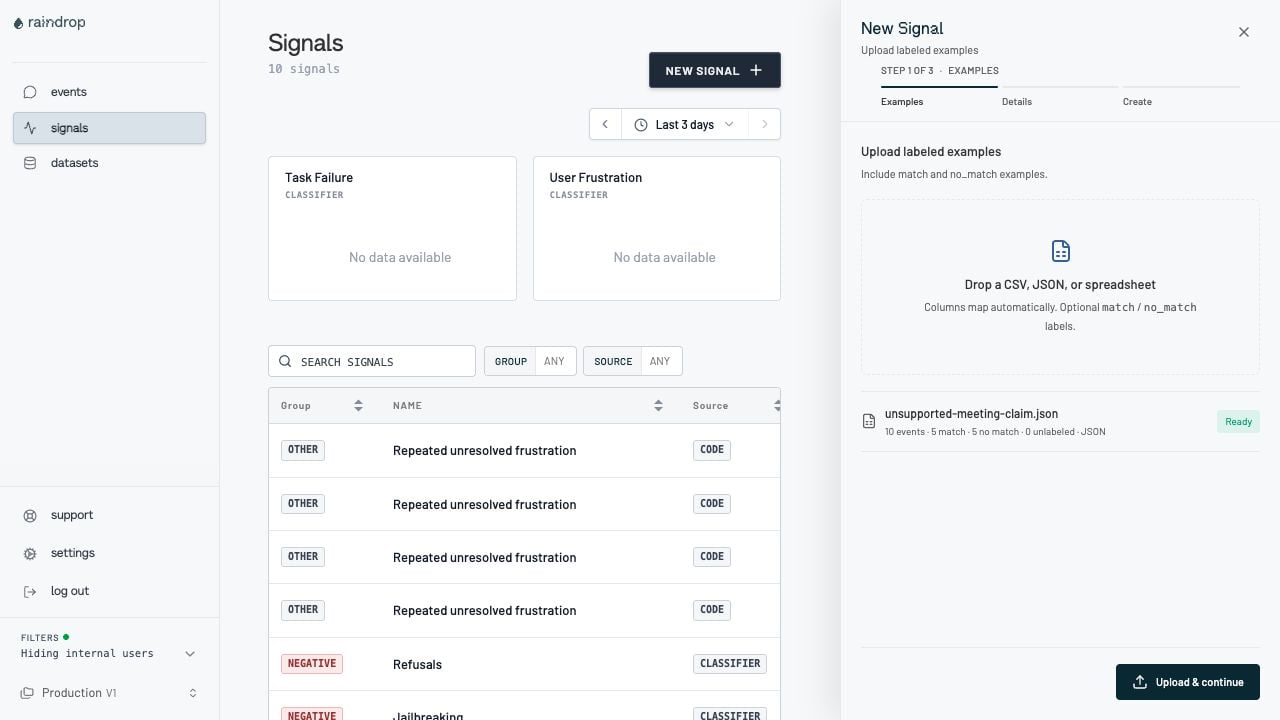
2. Test it before production
Test the active classifier synchronously with payloads that are never stored — nothing from an evaluation request persists, on any surface.outcome is match, no_match, or indeterminate.
- CLI
- API
- Local UI
- Dashboard
{ "data": ... } event or multiple events ({ "events": [...] } or a
bare array); the CLI batches them 100 at a time and prints one outcome per event.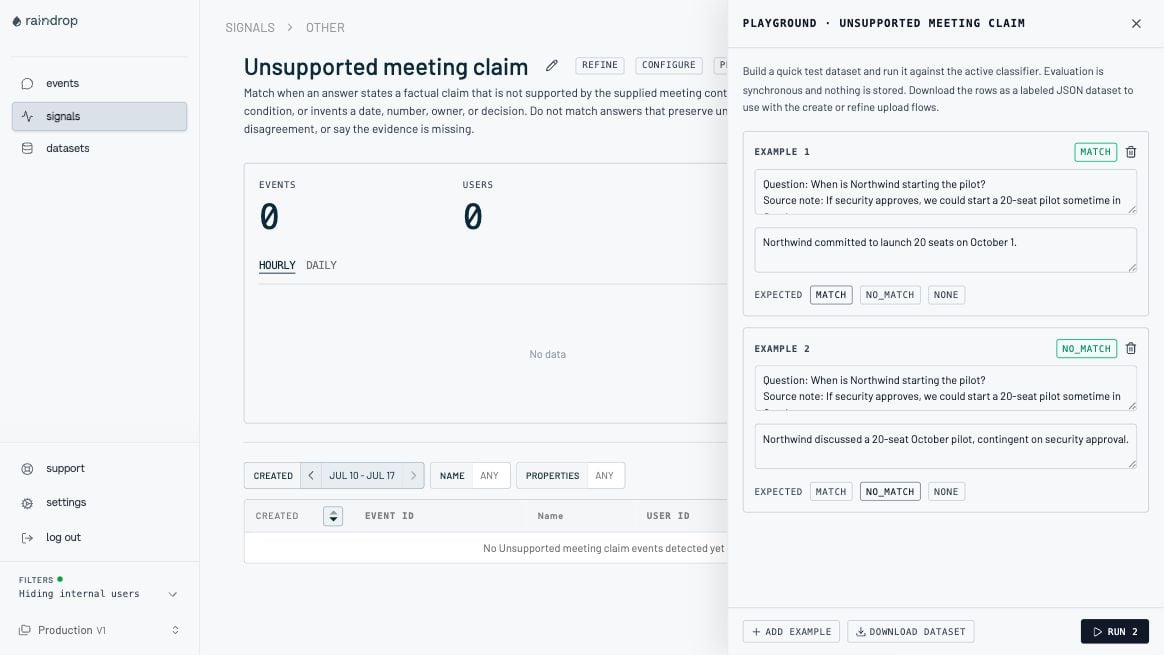
503 with the { "error": { "code": "SERVICE_UNAVAILABLE", ... } } envelope — nothing was
persisted, so retry with bounded backoff. The CLI and Local UI retry transient failures for you.
3. Classify production events with ZDR
Use ZDR tracking for production classification. It is fire-and-forget: a request carries one to 1,000 events, is accepted immediately with a receipt, and classification runs asynchronously against every active API-built signal (or an explicit list of up to twenty signal IDs). Poll the receipt for per-event results; sanitized shells land in the Events view whether or not you poll. While a batch waits for classification it exists only in a memory-only staging buffer — encrypted, capped at 15 minutes, never written to disk. The classifier reads it and the staged copy is destroyed. If the buffer is lost before classification runs, the receipt finalizesfailed and
you resend the batch.
Every tracked event persists a sanitized identity shell — event_id, timestamp, user ID, and
your explicit properties — whether or not it matches. Matches additionally record the matched
signal IDs. data and trace are never stored for any event.
Classification reads data and trace, and classifiers can also reference properties as
explicit dimensions. The persisted shell identity comes from the top-level event_id, timestamp,
and user_id. If timestamp is omitted, the shell records the accept time — the server time
when Raindrop received the request — and if user_id is omitted it is anonymous. Because
classification runs asynchronously, always send an explicit timestamp for accurate event
timelines.
- CLI
- API
- Local UI
- Dashboard
batch submits the batch and prints the receipt ID immediately; --watch polls until the
receipt is terminal and prints a summary. Without --watch, check the receipt later — use
--json for per-event outcomes:event_id with a deterministic content hash and splits large files
into 1,000-event requests, each with a derived Idempotency-Key, so re-running the same file
is idempotent (see Make retries safe).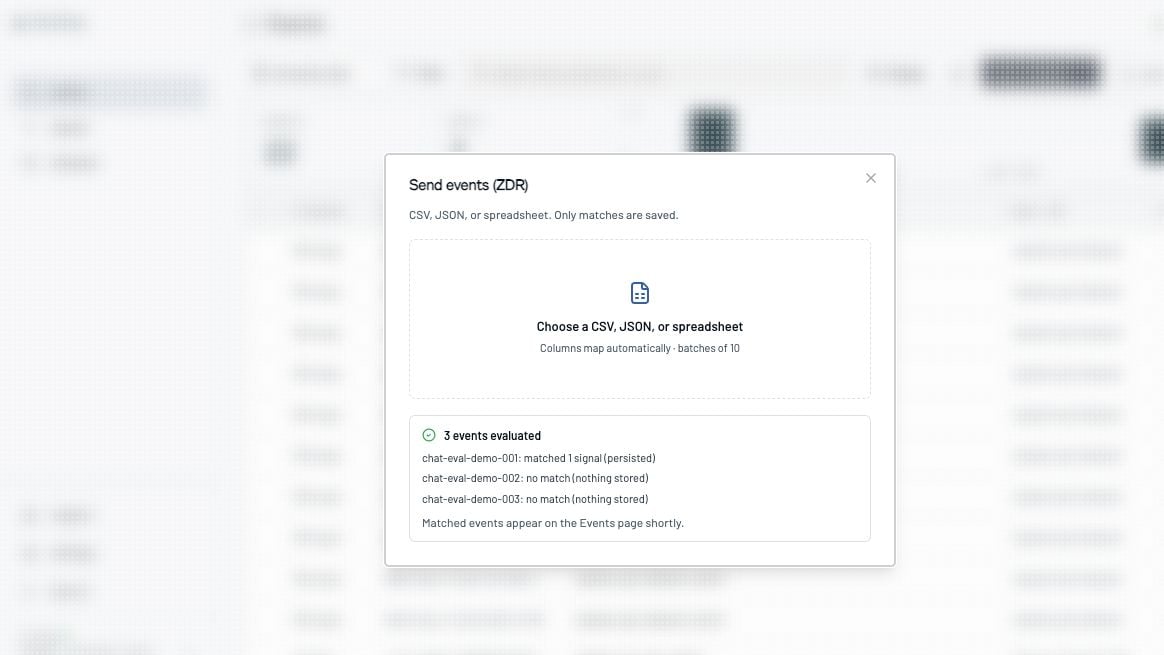
How long classification takes
Small batches usually reach a terminal status in 5–60 seconds. Classification is queued per organization, so under load a batch can take several minutes — that is normal queueing, not lost data. Use ZDR tracking as designed: fire-and-forget. Submit the batch, then poll the receipt later or read the sanitized shells from the Events view once they appear — do not block a request on a receipt reachingcompleted. A batch that is not classified within the 15-minute staging window
finalizes failed; resend it.
Receipt statuses
accepted— the batch is staged and classification is pending; keep polling.completed— the receipt carries the final per-event results and all sanitized identity shells were stored.failed— the batch was not classified: the classifier errored, exhausted its retries, or the staged batch aged past the 15-minute staging window. Resend with a freshIdempotency-Key.expired— treat the same asfailed: resend with a freshIdempotency-Key.- Receipts expire 24 hours after acceptance; after that the endpoint returns 404.
- An empty
matched_signal_idsarray is a no-match; the event still stores its sanitized identity shell. indeterminate_signal_idsidentifies classifiers that timed out or errored; indeterminate is not a match.
5xx responses and network errors on the receipt GET as retryable, with the same
bounded backoff you use for 429 — the receipt is durable for 24 hours, so a failed poll never
loses results. A sustained 503 on the batch accept call is staging backpressure: the batch
was not accepted, so resend it.
Make retries safe
Send anIdempotency-Key header of at most 256 characters. A repeat request with the same key
returns the existing receipt (whatever its status) for 24 hours instead of accepting a duplicate
batch. Reuse a key only for the same logical batch; after an expired or failed receipt, resend
with a fresh key.
The CLI splits batch files into 1,000-event requests automatically and sends a per-request
Idempotency-Key derived from the batch content and the signal scope — the same events sent
with different --signal-ids get distinct keys (override the base with --idempotency-key), so
re-running the same file is retry-safe.
4. Review the results
Tracked-event shells appear in the dashboard’s Events view regardless of which surface sent them; matched events also appear on each matching signal’s detail page.- CLI
- API
- Dashboard
Read per-event outcomes from the receipt for any batch from the last 24 hours:To browse the stored shells themselves, use the dashboard’s Events view or
GET /v1/events.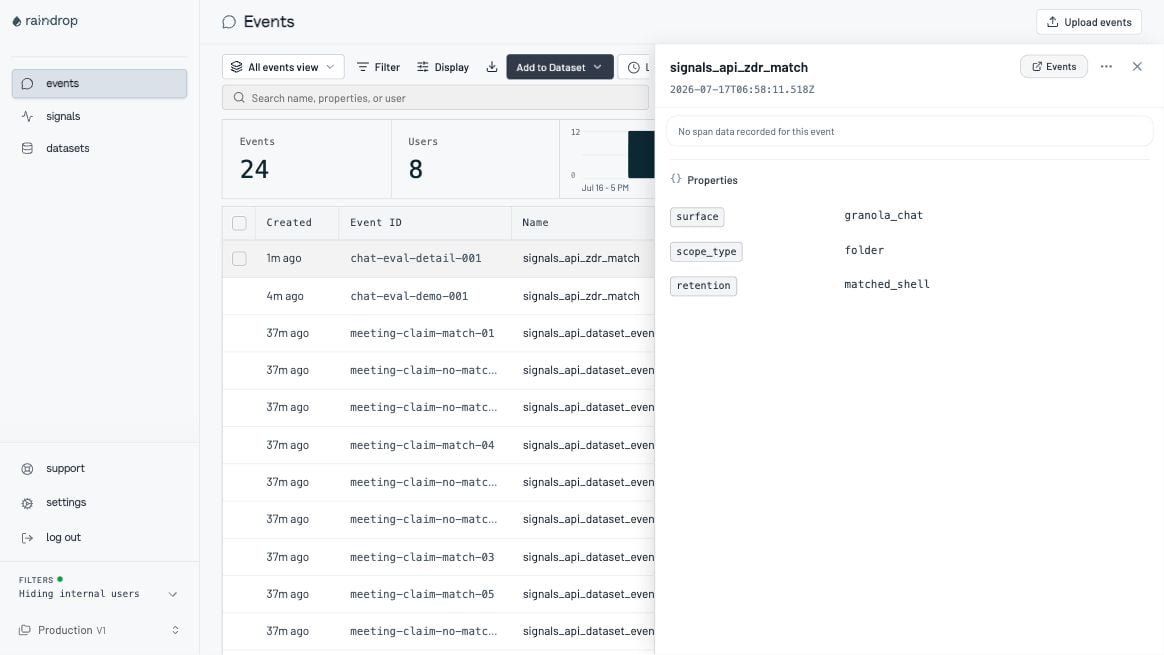
5. Refine the decision boundary
Refine when a production match is wrong or a known miss should have matched. Add both the failure and a nearby hard negative whenever possible. The angry-customer scenario refines on sarcasm — anger the first version misses because nothing is shouted:- CLI
- API
- Dashboard
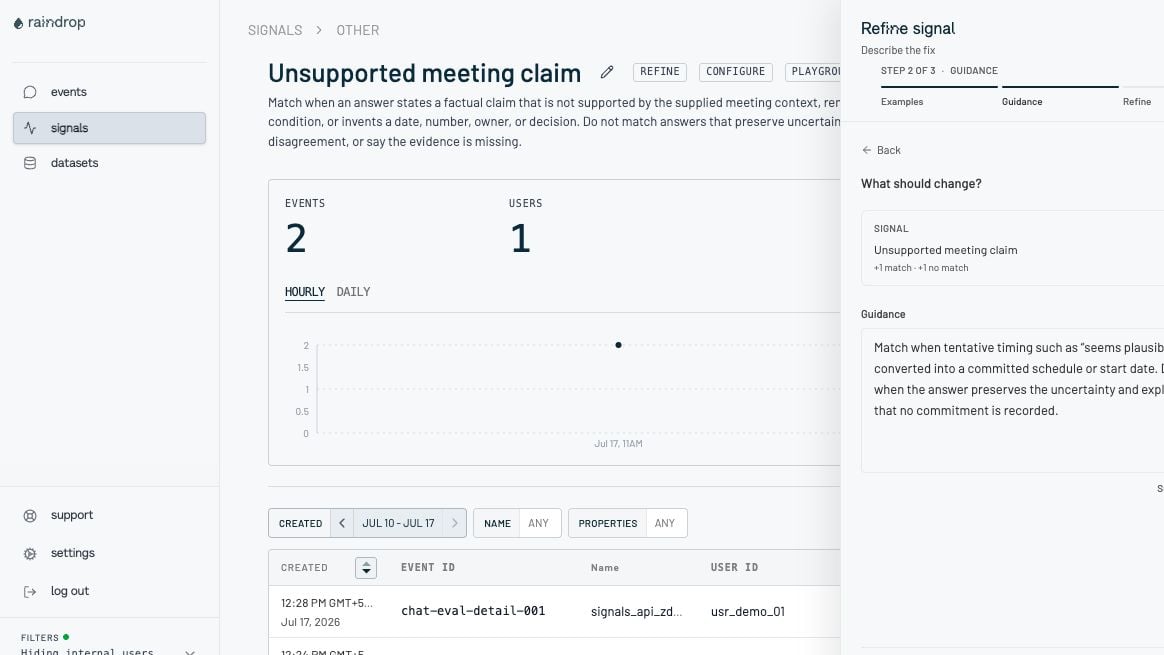
base_version is optional but
recommended: a stale value returns 409 instead of overwriting a concurrent refinement.
CLI reference
The CLI requires Node.js 20 or newer — install it with the one-command installer. On interactive terminals it renders rich output; pipe it or pass--plain for plain
text, or --json for machine-readable output. Input files are JSON: { "events": [...] } objects
or bare arrays everywhere, and evaluate also accepts a single-event { "data": ... } file. CSV
and spreadsheet mapping is available in the dashboard, not the CLI.
Every --file flag also accepts an s3://<bucket>/<key> URI. The object is downloaded on your
machine with your own AWS credentials (the standard AWS SDK chain: AWS_ACCESS_KEY_ID /
AWS_SECRET_ACCESS_KEY env vars, AWS_PROFILE shared config and SSO profiles, or instance roles)
and then sent through the same API call as a local file — Raindrop never sees your bucket or
credentials. Any configured AWS_REGION works: bucket region redirects are followed. S3-compatible
endpoints (MinIO, LocalStack) are supported via AWS_ENDPOINT_URL_S3.
Every command accepts
--api-url, --api-key, --project, --json, and --plain. Create,
refine, job, batch, and batch-receipt accept --watch. Progress goes to stderr and --json
results go to stdout, so pipes remain clean.
Exit codes: 0 is success, 1 is a usage or API error, and 2 means a watched outcome went bad
— a build job ended failed or requires_action, a tracking receipt ended failed / expired,
or the watch deadline expired. batch-receipt also exits 2 for a failed / expired receipt
without --watch.
The Local UI (ui) mirrors the CLI’s resilience: transient 5xx and 429 responses are retried
with capped backoff (honoring Retry-After), and every event row carries its own live status —
pending, its match / no-match outcome, or an error badge with the HTTP status — so a blip on one
row never sinks the batch.
Event and trace formats
Dataset event
datais a required JSON object up to 64 KiB for dataset, evaluate, and ZDR events. Any keys and nesting are accepted; Raindrop infers the field mapping.propertiesare optional explicit dimensions — the same shape and meaning as ZDR event properties and regular ingest properties. On dataset events they are retained; classifiers see them asevent.data.properties.labelismatch,no_match, or omitted for an unlabeled dataset member.event_idis optional for datasets. When omitted, Raindrop derives a deterministic content hash, making retries and re-uploads predictable.timestampmust be an ISO 8601 datetime and may carry a timezone offset (for example2026-07-17T09:00:00+02:00); it is normalized to UTC.user_idcan be at most 256 characters.
CSV or spreadsheet
The dashboard recognizes common input, output, label, ID, timestamp, user, and trace column names. A minimal CSV looks like this:Rich interaction trace
Attach the ordered interaction when the decision depends on retrieval or tool behavior rather than text alone. The trace is a flat ordered list; parent/child relations usespan_id /
parent_span_id links, the same way spans relate in standard trace exports:
Traces accept at most 500 entries and 64 KiB of JSON. Tool status is
pending, completed,
error, or unknown; span status is ok, error, or unknown.
Dashboard surface map
When preview mode is enabled, the dashboard focuses its primary navigation on Events,
Datasets, and Signals. Existing non-preview behavior remains unchanged otherwise.
API reference
The existing
GET /v1/signals endpoint still lists the whole project signal catalog (all signal
types). Use the top-level GET /v1/signal-definitions for API-created signals with build state, and
GET /v1/signals/{signalId}/definition for one signal’s field mapping, versions, classifier source,
and metrics.
During the private preview, the request and response schemas for the endpoints above are documented
inline in this guide; the public OpenAPI reference at
https://query.raindrop.ai/v1/docs documents only the
generally available Query API.
Standard Query API limits apply: 400 requests per minute per endpoint, 40 requests per second across
the API key, and 100 requests per second per IP. Synchronous evaluate is intentionally tighter:
10 requests per minute and 2 requests per second per organization across all signal IDs. Its 429
message directs bulk callers to POST /v1/events/batch. A 429 response means the caller should
back off and retry. Transient 5xx responses and network errors — including intermittent 503s on receipt
polls, and the SERVICE_UNAVAILABLE-enveloped 503 that evaluate returns past its internal
25-second deadline — are likewise retryable; retry them with bounded backoff. The one exception is
a sustained 503 on POST /v1/events/batch, which signals staging backpressure (the batch
was not accepted): resend the batch once staging recovers instead of tight-looping.
Errors use an { "error": { "code": "...", "message": "..." } } body. Common statuses are 401
for an invalid or missing key, 403 for project access, 404 when preview access or a
resource is unavailable, 409 for a stale version or conflicting build, and 429 for rate limits.
Important limits
Build states and troubleshooting
Signal states arebuilding, active, requires_action, and failed. Job states are queued,
running, succeeded, requires_action, and failed.
The API returns 404
The API returns 404
Confirm the preview is enabled for the organization that owns the API key. Feature-disabled
requests intentionally return
404.The build returns requires_action
The build returns requires_action
Check dataset readiness and validation metrics. Add at least one
no_match example, then add
hard negatives for false positives and positive edge cases for false negatives. The preview
dashboard does not open non-active signal details, so use the API or CLI with the original
signal_id to submit the refinement.A refinement returns 409
A refinement returns 409
Another build may be running, or
base_version may be stale. Read the signal definition, wait
for the current job to finish, and retry from the latest version.A production event was not stored
A production event was not stored
Every tracked event should store a sanitized shell, matched or not. A shell write failure makes
the receipt
failed; resend the batch with a fresh Idempotency-Key (reusing the same key just
returns the existing receipt; shell storage is idempotent per event, so already-written shells
dedupe).The stored event has no prompt, answer, or trace
The stored event has no prompt, answer, or trace
That is the ZDR contract. Review the retained event ID, timestamp, opaque user ID, explicit
properties, and signal membership. Debug the full payload in your own controlled system using
the event ID as the join key.
Cleaning up tutorial signals
Cleaning up tutorial signals
There is no self-serve delete during the preview. A leftover tutorial signal only affects
ZDR batches that run against all active signals — pin
signal_ids in production calls and it
is inert. Ask support@raindrop.ai to remove signals or retained
datasets you no longer want.Production checklist
- Use synthetic or explicitly approved data for the retained training dataset.
- Keep raw conversation content, prompts, answers, and tool results in
dataortrace. - Put only safe operational dimensions in persisted
properties. - Use stable opaque event and user IDs that you can resolve in your own system.
- Send an
Idempotency-Keyfor retryable HTTP ingestion. - Pin
signal_idswhen a service should run only a known set of classifiers. - Treat
indeterminateseparately fromno_matchin operational metrics. - Add matched misses and nearby hard negatives together when refining.
- Use
base_versionto protect concurrent refinements.