

- Daily Digest. Built in. A morning read on how yesterday went.
- Custom briefs. Your question, on your schedule.
- Change Reports. Started by a merge, about the change itself.
Daily Digest
Turn it on and every morning an agent goes through the last 24 hours and compares them with the day before: which signals moved, which issues are still open, what showed up for the first time, and which conversations show the problem. It also calls out anything that would distort the picture, like a noisy signal or a tool that keeps failing. Compact mode posts one-liners with the details in-thread. Turn it on at Settings → Notifications.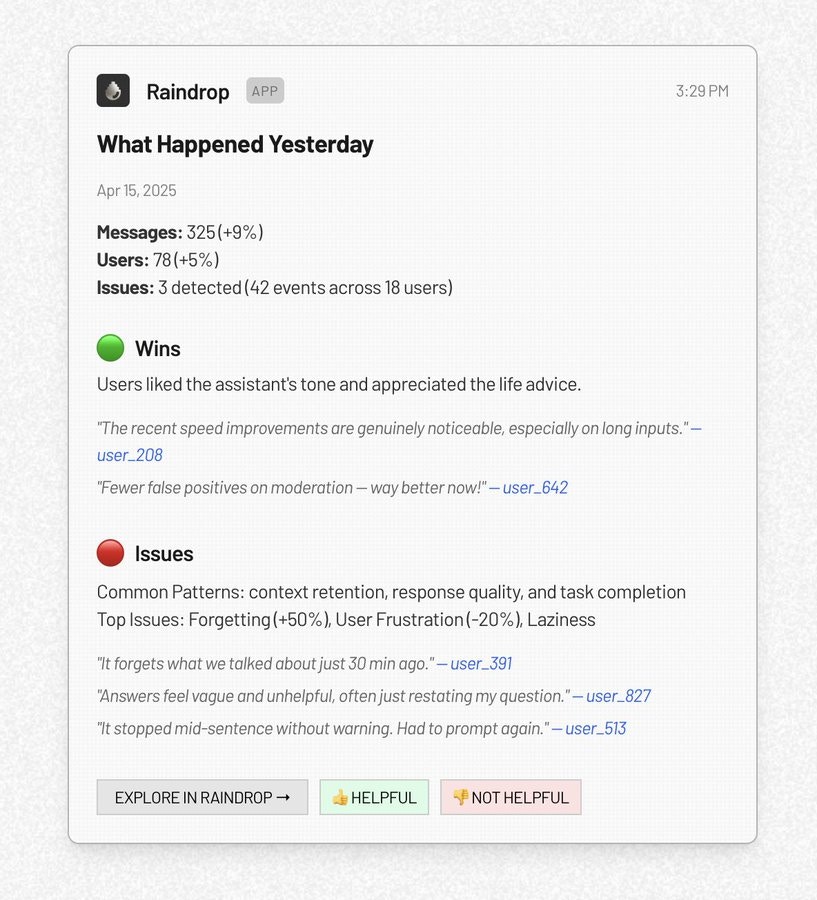
Custom briefs
Ask a question once and get the answer on a schedule. Write it the way you’d ask a teammate:Summarize tool error rates each morningWeekly, show me which users churned last week and what issues they hitEvery Monday, highlight any new use cases from last weekEvery day until Friday, report on the checkout-v2 rollout
Change Reports
Connect GitHub and a merge starts a brief. Raindrop works out which agent the pull request changed and how, watches the production traffic that followed, and reports back on whether the new behavior showed up and how users reacted. See Change Reports.Reference
Related
- Notifications for everything Raindrop sends and how it is routed
- Signal Alerts for real-time alerts when a signal spikes
- Triage Agent for the agent behind custom briefs
- Change Reports for monitoring a merged change